Loaders
The Loaders step is where load unit models are defined. Individual instances of loaders are specified later on in the Items Step. Each loader model has several configurable properties, detailed below.

Inputs
| Property | Description |
|---|---|
| Power Type | The power source for the load unit: Diesel, Battery, or None. Setting this to None will disable refueling/recharging of the truck in the simulation. |
| Loadable Trucks | The truck models that the loader can load. |
| Payload | The quantity of material that can be carried in the loader's bucket. This input may be stochastic. For more information, see the following link. |
| --- Cycle --- | |
| Loaded Swing Time | The time it takes for the load unit to swing its loaded bucket from the dig face to the truck. This input may be stochastic. For more information, see the following link. |
| Unloaded Swing Time | The time it takes for the load unit to swing its empty bucket from the truck to the dig face. This input may be stochastic. For more information, see the following link. |
| Dig Time | The time it takes for the load unit to fill its bucket with material. This input may be stochastic. For more information, see the following link. |
| Dump Time | The time it takes for the load unit to dump its material from the bucket into the truck tray. This input may be stochastic. For more information, see the following link. |
| Approximate Spot Time | The approximate time it takes for a truck to reverse under the load unit. This value is used to establish a dig rate. This input may be stochastic. For more information, see the following link. |
| --- Fuel --- | |
| Fuel Tank Capacity | The capacity of the load unit's fuel tank. |
| Loaded Swing Fuel Rate | The fuel usage, expressed as units/hr, when the loader is swinging a loaded bucket. |
| Unloaded Swing Fuel Rate | The fuel usage, expressed as units/hr, when the loader is swinging an empty bucket. |
| Dig Fuel Rate | The fuel usage, expressed as units/hr, when the loader is digging and filling its bucket. |
| Dump Fuel Rate | The fuel usage, expressed as units/hr, when the loader is dumping its material. |
| Idle Fuel Rate | The fuel usage, expressed as units/hr, when the loader is sitting idle. |
| --- Power --- | |
| Loaded Swing | The power usage, expressed in kW, when the loader is swinging a loaded bucket. |
| Unloaded Swing | The power usage, expressed in kW, when the loader is swinging an empty bucket. |
| Dig | The power usage, expressed in kW, when the loader is digging and filling its bucket. |
| Dump | The power usage, expressed in kW, when the loader is dumping its material. |
| Idle | The power usage, expressed in kW, when the loader is sitting idle. |
Loader Operating Profiles
The dig rate discussed below represents the rate assuming the load unit has an infinite queue of trucks, with no hang time or operational delays
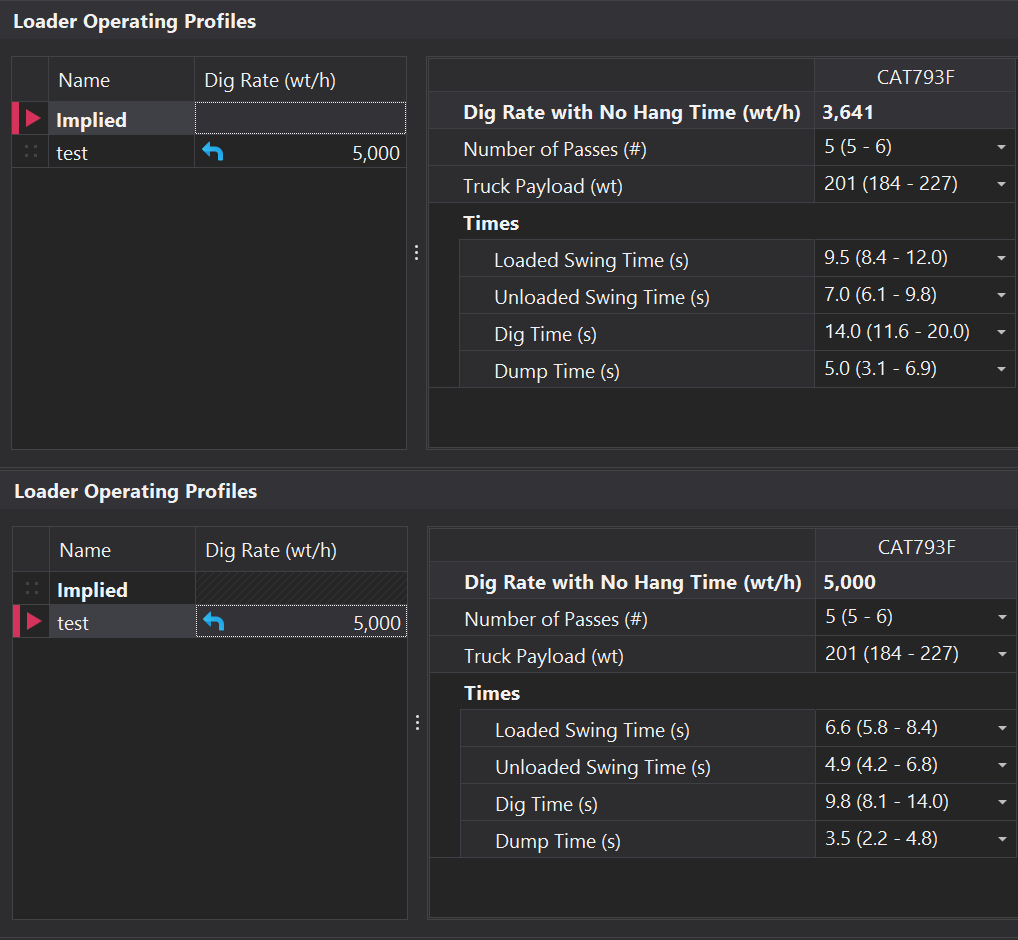
A load unit's dig rate often varies due to external factors such as geology or operator competency. By default, the dig rate is calculated based on cycle times (as outlined in the table above), which typically constrains it within a narrow range. To better account for changes in operating conditions that can significantly impact loader rates, Loader Operating Profiles can be used to reflect these variations more easily.
For each profile, which are defined in the Lists step, a dig rate can be specified in wet tonnes per hour. A scaling factor is then calculated using the dig rate derived from the cycle time inputs. All cycle time inputs are scaled accordingly to align with the new dig rate. These scaled values can be seen in the Times container, and are used during the simulation to ensure the dig rate accurately reflects the selected profile.