FAQ
How are truck travel times calculated?
For each "segment" of road along a truck's path, there are a couple of important properties that are pre-calculated:
-
External Acceleration
This is the acceleration imposed on the truck when on that road segment from external sources, which currently are gravity and rolling resistance.
That is, for a road segment with
- Gradient
thetain radians - Rolling resistance coefficient
rr(e.g. 5% rolling resistance meansrr= 0.05) - Gravitational acceleration
g(e.g. 9.81 m/s/s)
The external acceleration is:
-g * (sin(theta) + rr * cos(theta)) - Gradient
-
Max Speed
This is the maximum speed the truck is allowed to have when on this segment of road, and so the truck will if needed slow down before reaching this segment to make sure to not exceed the limit.
This is the calculated as the minimum of several factors:
- The speed limit sign associated with the road segment
- The speed limit from the manual "gradient speed limit" curve for that truck type sampled at the road segments gradient
- If "use braking curve" is enabled, then the maximum speed on the monotonically non-increasing braking curve where there is sufficient braking force to slow down at the target deceleration (e.g. 1.5 km/h/s), while taking into account the external acceleration
During the simulation, while travelling a truck generally wants to either decelerate for some reason, or otherwise travel as fast as possible.
When it wants to decelerate for some purpose it will do so at its target deceleration (e.g. 1.5 km/h/s), without considering the braking curve, even if it is enabled, because the ability to do so has already been checked when it performed the path finding and chose to use that road segment.
The exception to that rule is when following another truck, in that case it will control its deceleration to try to more smoothly follow the truck in front, and so may choose to decelerate slower than the target deceleration.
When it wants to travel as fast as possible, if it is already at that road segment's speed limit, then if the external acceleration of that road segment is > 0, that is the truck is going downhill and gravity is trying to accelerate the truck, then it will apply sufficient brakes to avoid accelerating. And since if "use braking curve" is enabled, it already validated that it could achieve the target deceleration on that road segment, it knows it can achieve 0 deceleration, so it never looks up the braking curve - it just maintains its current speed.
If it is already at the road segment's speed limit, and the external acceleration is < 0, so that gravity and/or friction
is trying to slow down the truck, then it samples the truck's rimpull curve at its current speed to find the total amount
of force available, and limits that to at most -external acceleration * truck mass, so that the resulting net acceleration is zero.
If the truck is not already at the road segment's speed limit, then it samples the truck's rimpull curve at its current speed
to find the total amount of force available, and adds to that external acceleration * truck mass to get the net available force, and then it limits that to at most max acceleration * truck mass (max acceleration is typically 1.5 km/h/s), so that it doesn't exceed the max acceleration.
In summary, the parameters that effect the truck's speed on a given path are:
- Road gradient
- Road rolling resistance
- Road speed limit
- Truck type "gradient speed limit" curve
- Truck type "braking curve", but only when "use braking curve" is enabled, and even then only via imposing a max speed limit
- Truck type rimpull curve
- Truck type empty mass
- Truck type Max Unloaded Acceleration
- Truck type Max Loaded Acceleration
- Truck type Target Unloaded Deceleration
- Truck type Target Loaded Deceleration
- Current payload mass
Why am I getting the following warning 'Curve Not Traversable' ?
If you receive this warning message in the Design tab, it is because the specified truck(s) do not have enough braking force requried to travel safely down the segment. Two critical components must be considered in calculating the total braking force required:
Weight Component (Gravitational Force): This is the force that the brakes must overcome just to prevent the truck from accelerating downhill due to gravity. It can be thought of as the minimum force required to maintain speed or prevent acceleration.
Deceleration Component: This is the additional force required to actually slow the truck down at the specified deceleration rate. When you want to achieve a certain rate of deceleration, you need to account for the inertia of the truck. The faster the truck is moving or the heavier it is, the more braking force will be required to achieve the desired reduction in speed.
Worked Example
Weight Component
Deceleration Component
Total Force
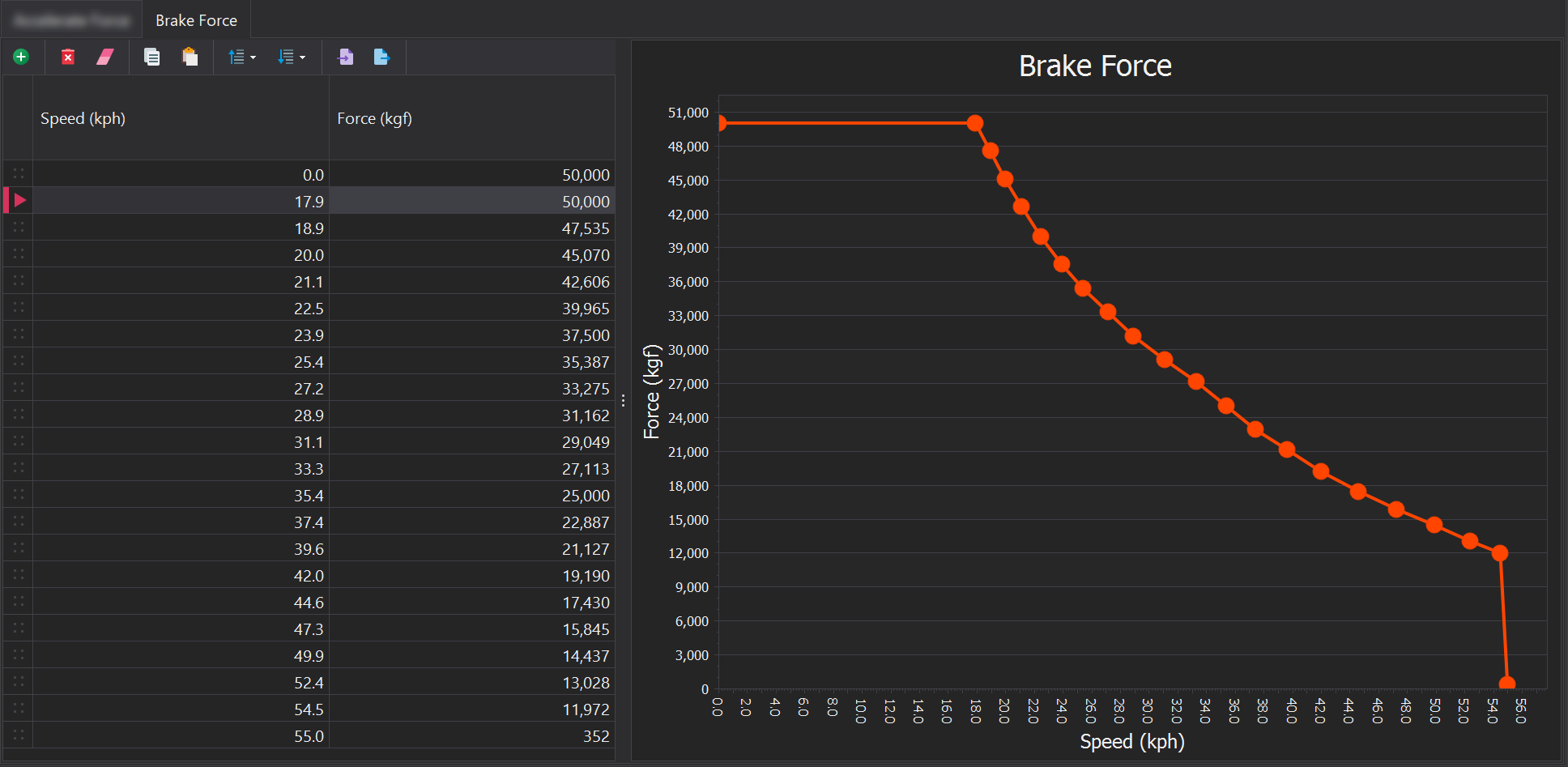
If the truck uses the following braking curve, it can be seen the maximum braking force avaiable is 50,000 kgf which is below the 54,677 kgf needed.
Why can't I report Cycle Times ?
The simulation's Dispatch engine dynamically assigns trucks after they dump their load, meaning there is no guarantee that a truck will return to the same source loader. As a result, reporting cycle time is not meaningful since complete cycles may not always occur.
Within the Destination reporting source, the value field 'Average Loaded Haul Duration (minutes) Total' represents the average time taken for loaded travel from a source to a destination.