Lanes
Lanes represent the roads that vehicles travel along during the simulation. Configuring lane types involves two main steps:
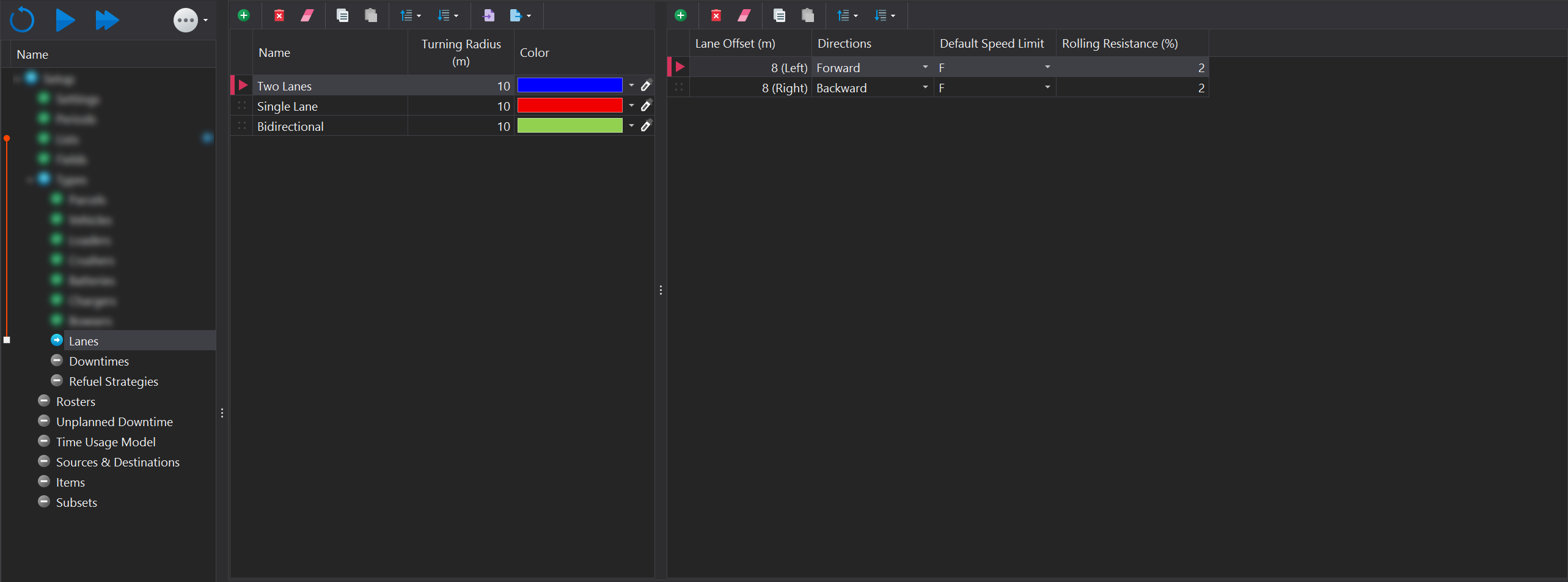
Lane Definition
In this step, you define the lane and set up the core characteristics and properties that will be applied to each individual lane within this lane type.
Lane Definitions are managed using the toolbar located at the top of the page. More information on the functions within the toolbar can be found in the Common User Controls page. Each lane type must have the following properties specified:
| Input | Description |
|---|---|
| Name | The name that will be used to represent the lane type (e.g., Double Lane, Single Lane). |
| Turning Radius | Specifies the minimum turning radius for this lane type. |
| Color | Sets the display color for the lanes when shading by lanes in Designer and Animation viewports. |
Lane Instances
Here, you create the individual lane instances that reside in the corresponsing lane type. For example, a lane type called "Two Lanes", would have two lane instances created, each with properties specific to that instance (e.g., offset, traffic direction).
Lane Instances are managed using the toolbar located at the top of the page. More information on the functions within the toolbar can be found here in the Common User Controls page. Each lane instance type must have the following properties specified:
| Input | Description |
|---|---|
| Lane Offset | The offset distance from the road centerline. Use negative values for a left offset and positive values for a right offset.  |
| Directions | Specifies the direction of travel allowed along the lane: Forward, Backward, or Both. |
| Default Speed Limit | The default speed limit for the lane when initially created. This speed can be adjusted after the lane is drawn. |
| Rolling Resistance (%) | The rolling resistance applied by the lane to vehicles traveling on it. |